
Disclosure: As an Amazon Associate I earn from qualifying purchases. Learn more
A tennis ball machine can turn an empty court into a repeatable practice session, whether you want to work on footwork, steady groundstrokes, or changing shot patterns. For home use, the best fit depends on more than launch speed: consider how easily you can move and store the machine, how much control it offers from your side of the court, and whether its battery and ball capacity fit your routine.
Our picks range from compact, app-controlled robots to a simpler knob-operated model. Product details below come from the supplied specifications; they are not based on hands-on testing. Availability can change, so check each listing before making plans.
Quick Comparison
| Tennis Ball Machine | Standout Features | Best Fit |
|---|---|---|
| TENNIIX Basic Tennis Ball Machine | Up to 75 mph, app and voice control, up to 4 hours of runtime | Portable, adjustable solo practice |
| LUMISTAR TERO Tennis Ball Machine | Up to 87 mph, triple-axis gimbal, app and wristband control | Full-court drills and varied shot direction |
| Veva R3 Pro Tennis Ball Machine | 28 shot locations, 80-ball capacity, up to 6 hours of practice | Structured drills and longer sessions |
| Spinshot Pro Tennis Ball Machine | Knob controls and flexible power options | Players who prefer straightforward controls |
| PUSUN Tennis Ball Machine | 28 landing points, app and remote control, 100-ball hopper | Custom placement and multiple control options |
Our Picks: Best Tennis Ball Machines for Home Use reviews
1. TENNIIX Basic: A Compact Machine with Flexible Controls

The TENNIIX Basic is a portable, dual-wheel machine designed for solo sessions. It weighs 18.7 pounds, folds to a compact size, and has a removable battery rated for up to four hours of continuous practice or as many as 1,800 shots per charge. Its listed top speed is 75 mph, and its hopper holds more than 100 balls.
Control is a major part of the package. The app allows detailed adjustments to speed, spin, launch angle, and feed timing, while the wrist controller and voice commands let you make basic changes without walking back to the machine. The product description also lists nine shot patterns and six Match Mode styles, with presets for different playing levels. That range could make it useful for players who want more than a steady feed to one spot.
At 18.7 pounds, it is one of the lighter choices here, though it still needs to be lifted into a car or storage area. The number of settings may also take time to learn if you only want a simple, repeatable feed. For players who value portability and drill variety, its balance of size and control is appealing.
- Pros:
- Compact fold and manageable listed weight for transport
- Removable battery rated for up to four hours of continuous practice
- App, voice commands, and wrist control provide several ways to manage drills
- More than 100-ball capacity and varied training modes
- Cons:
- Getting comfortable with the many settings may take practice
- Maximum speed is lower than the listed top speeds of some alternatives
Verdict: Choose the TENNIIX Basic if you want a relatively portable machine with detailed app controls and several ways to vary a solo session.
2. LUMISTAR TERO: Full-Court Practice with a Gimbal

The LUMISTAR TERO is built for players who want to work across the court rather than hit from one fixed feed. Its triple-axis gimbal changes shot direction and angle for forehand, backhand, and footwork practice. The listed maximum speed is 87 mph, with a reach of up to 85 feet.
The app lets you change placement, speed, spin, feed interval, and shot count. You can use preset drills, build custom sequences, or select random patterns for reaction practice. A wristband remote and voice commands offer control from your side of the court. For transport, the machine has built-in wheels and a pull handle; the main unit weighs 21.7 pounds, and the ball bag detaches for packing.
The app’s session tracking and progress reports may appeal to players who like keeping a record of practice. A Vision Dock is described as an optional upgrade for TERO PRO features, including cameras, shot analysis, and gesture control; those features are not part of the standard machine as described. The supplied product data marks this model as unavailable, so confirm it can be ordered before choosing it.
- Pros:
- Triple-axis gimbal supports changes in direction and angle
- Listed speed and reach suit baseline-to-baseline practice
- Custom, preset, and random drill options
- Wheels, pull handle, and detachable ball bag aid transport and storage
- Cons:
- At 21.7 pounds, it is heavier than the TENNIIX Basic and Veva R3 Pro
- The described AI and camera features require a separate Vision Dock
Verdict: The TERO is a strong feature match for full-court drills and app-based practice, but check availability and the cost of any optional upgrade before settling on it.
3. Veva R3 Pro: Many Drill Locations and Long Listed Runtime

The Veva R3 Pro focuses on structured practice. It offers topspin and backspin, horizontal oscillation, and 28 programmable shot locations, giving you options for working on placement and movement. Its hopper holds 80 balls, and feed intervals can be set from one to nine seconds.
The machine weighs 16.5 pounds, making it the lightest listed option in this comparison. Its product description claims up to six hours of practice, which may suit longer sessions, though actual runtime can depend on how you use the machine. Voice control is designed to let you start, stop, and adjust drills without returning to the unit. The description also mentions an optional remote, leak compensation, and over-the-air firmware updates.
Its combination of a light body and programmable locations is practical for a player who wants to set up varied drills without carrying a heavier unit. The listed 80-ball capacity is smaller than the TENNIIX and PUSUN hoppers, so expect to refill more often if you plan to hit continuously. The supplied product data marks this model as unavailable; check the listing before making it your pick.
- Pros:
- Light listed weight of 16.5 pounds
- 28 programmable locations with horizontal oscillation
- Topspin and backspin options
- Listed runtime of up to six hours
- Cons:
- 80-ball capacity is smaller than some machines in this group
- Availability is not confirmed in the supplied product data
Verdict: Consider the R3 Pro if low carry weight, programmable shot locations, and a long listed runtime matter most—and verify availability first.
4. Spinshot Pro: Simple Knob Controls and Flexible Power Options
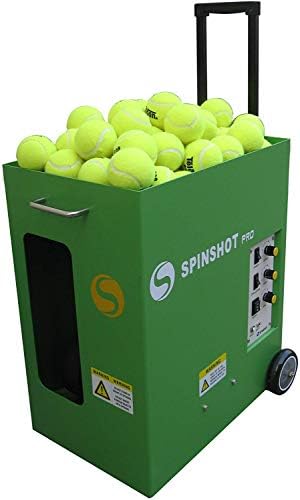
The Spinshot Pro is the straightforward choice in this group. Its listed controls use knobs rather than an app-based system, which can suit players who want to set the machine directly and spend less time navigating digital features. The product description also highlights flexible power options and a construction that is not made of plastic.
One important detail is the battery arrangement: a battery charger is included, but the actual battery is shipped separately and is not included in the machine’s box. Factor that into your setup and total purchase planning, and confirm which power option you need before ordering.
The supplied details do not specify its speed, ball capacity, feed patterns, or weight, so it is harder to compare its training range and portability with the other machines here. Its simpler control approach may be a plus, but buyers looking for app programming or clearly stated drill options may prefer one of the feature-rich alternatives.
- Pros:
- Knob controls offer a direct, simple operating approach
- Flexible power options are listed
- Product description states the machine is not made of plastic
- Cons:
- The actual battery is not included in the machine’s box
- Supplied details do not specify speed, capacity, or drill options
Verdict: Choose the Spinshot Pro if you prefer physical controls and are comfortable confirming the power setup and separately arranging the battery.
5. PUSUN: Custom Placement with a Large Hopper

The PUSUN is designed for players who want to program where the ball lands. It offers 28 placement points, external oscillation, and a listed speed range of 12 to 75 mph. Feed intervals range from 1.8 to 8 seconds, with six spin levels. Its 100-ball collapsible hopper and external battery are described as supporting four to six hours of practice.
Control options include an app, a remote, and Apple Watch compatibility. The product description also lists 12 drills, a progression from NTRP 1.0 to 5.0, and a Padel Mode with 14 specialized drills. It is a heavier option at 32.6 pounds, so its portability may be less convenient than the lighter TENNIIX and Veva machines, even though it is designed to fit in an SUV trunk.
PUSUN states that the machine works with pressurized, non-pressurized, and training balls and has a dust-resistant design for use on hard courts and clay. Those details may matter if you practice on different surfaces or use different ball types. The supplied product data marks it unavailable, so confirm current listing status before building your training plan around it.
- Pros:
- 28 programmable landing points and six spin levels
- 100-ball hopper and listed four-to-six-hour battery runtime
- App, remote, and Apple Watch compatibility
- Designed to work with several types of tennis balls
- Cons:
- At 32.6 pounds, it is the heaviest listed model here
- Availability is not confirmed in the supplied product data
Verdict: The PUSUN suits players who want many placement options and a large hopper, provided its weight and availability work for your setup.
How to Choose a Tennis Ball Machine for Home Use
Match the machine to your court space
Think about the drills you can realistically do where you play. A fixed feed may be enough for steady strokes, while adjustable direction and programmed landing points can help you cover more of the court. Check the machine’s listed reach and shot patterns against your available court space, and leave room to position and retrieve the unit safely.
Consider how you will control each session
Knobs provide a direct way to change settings on machines that use them. App control can offer more detailed adjustments and saved drills, while voice commands or a wrist remote can reduce trips back to the machine. Choose the controls you are most likely to use; a long list of features is only helpful if the setup feels manageable to you.
Check battery life and power requirements
For practice away from an outlet, compare the stated runtime and check whether a battery is included. The Spinshot Pro’s supplied details specifically say its battery is sold separately, even though a charger is included. Other models list removable or external batteries, but their stated runtime is a product claim rather than a guarantee for every drill or setting.
Balance ball capacity with portability
A larger hopper can mean fewer interruptions to reload, but it may add size or weight. Compare the capacity with how long you typically practice, then think about lifting the machine into a car and storing it at home. Wheels, handles, a folding design, or a detachable ball bag can make moving and packing easier.
Look for the drills you will actually use
Speed, spin, feed interval, oscillation, and landing-point controls shape the practice experience. Beginners may want a repeatable feed and simple settings, while more experienced players may value variable placement and customized sequences. Do not assume that two machines have the same drill options just because both offer adjustable speed.
Confirm ball compatibility and upkeep details
Check whether the machine is intended for the balls you already own. The PUSUN description lists compatibility with pressurized, non-pressurized, and training balls, while the other supplied descriptions do not provide the same range of detail. Also consider where you will store the machine and whether its design suits the court surface you use.
Verify what is included before ordering
Read the listing carefully for batteries, remotes, bags, and optional accessories. Some advanced functions may depend on an add-on rather than being included with the basic machine. Since product availability and package details can change, confirm both before you buy.
Frequently Asked Questions
Are tennis ball machines useful for home practice?
They can help you repeat a feed and work on consistency, movement, or shot placement without relying on a hitting partner. The right model depends on your available court space, the drills you want, and how easy the machine is for you to move and operate.
How much ball capacity do I need?
That depends on how long you want to practice before taking a break to reload. A larger hopper can reduce interruptions during longer sessions, while a smaller capacity may be adequate for short drills. Also consider the weight and storage needs of the machine.
Do tennis ball machines need to be plugged in?
Some models use batteries or offer flexible power options, but the setup varies. Check the product details for battery inclusion, charging requirements, and stated runtime. In particular, the Spinshot Pro listing says its battery is shipped separately.
Is app control better than knob control?
Neither is best for everyone. An app can provide detailed adjustments or saved drills, while knobs can be simpler for direct changes. Wrist remotes and voice controls offer another way to manage a session without returning to the machine.
Can beginners use these machines?
Yes, as long as the machine offers settings that match your current skill and practice goals. Start with a comfortable speed and a predictable feed, then add spin, movement, or more complex patterns as you improve.
Which option is easiest to carry?
Based on the listed weights, the Veva R3 Pro is lightest at 16.5 pounds, followed by the TENNIIX Basic at 18.7 pounds. The LUMISTAR TERO weighs 21.7 pounds, and the PUSUN weighs 32.6 pounds. The supplied details do not state the Spinshot Pro’s weight.
Final Recommendation
For a well-rounded home practice setup, the TENNIIX Basic is the most balanced pick in this group: it combines a manageable listed weight, a more-than-100-ball capacity, app adjustments, and hands-free controls. If your priority is programmable placement, compare the PUSUN and Veva R3 Pro, while the LUMISTAR TERO stands out for its stated reach and gimbal-based direction changes. Prefer a simpler control style? The Spinshot Pro may fit, but plan for its separately sold battery. Check current availability and exactly what is included before choosing.