
Disclosure: As an Amazon Associate I earn from qualifying purchases. Learn more
An oscillating tennis ball machine can help you practice court coverage, footwork, and shot consistency without a partner feeding every ball. The right choice depends on how you want balls distributed, how much control you need over speed and spin, and how often you want to stop and reload. Below, we compare five machines, from straightforward knob-controlled models to app-enabled options with more training modes.
Quick Comparison
| Machine | Oscillation and controls | Notable specifications | Best suited for |
|---|---|---|---|
| SENODON Oscillating Tennis Ball Machine | Built-in oscillation; remote and app control | 10–60 km/h; 50-ball capacity; stated 2–4 hours of use | Players who want app control and adjustable drills |
| Furlihong 3807BH Tennis Ball Machine | Automatic up-and-down launch-port movement; adjustable speed | Triangular iron base; battery or AC power | Players who want simple controls and flexible power options |
| Tennis Tutor Prolite | Built-in random oscillator; knob controls | 10–70 mph; 125-ball capacity; up to four hours per charge | Players seeking random court distribution and a large hopper |
| Tennis Tutor Prolite Plus | Built-in random oscillator; one-touch topspin or underspin | 10–75 mph; 110-ball capacity; up to four hours per charge | Players who want spin options and random feeds |
| PUSUN PT-Smart Pro | Internal oscillation; app and remote control | 12–75 mph; 100+ ball capacity; stated 4–6 hours of use | Players interested in structured drills and app control |
Our Picks: Best Oscillating Tennis Ball Machines reviews
1. SENODON Oscillating Tennis Ball Machine: App and Remote Control

The SENODON is a compact automatic launcher with built-in oscillation, remote control, and app control. You can adjust its feed interval, ball speed, spin type, and shot depth, giving you several ways to shape a solo practice session. The stated speed range is 10 to 60 km/h, or about 6 to 37 mph.
Its 50-ball capacity is smaller than the Sports Tutor models listed here, so you may need to reload more often during longer sessions. The machine has a removable 5Ah lithium battery, and the supplied specifications state two to four hours of continuous use. Built-in wheels are intended to make it easier to move around the court.
This machine may suit beginners and recreational players who want adjustable drills without committing to a larger-capacity hopper. Its app and remote options are convenient in principle, but players who prefer simple physical controls may find the added control choices unnecessary. Its maximum listed speed is also lower than those of the Sports Tutor and PUSUN machines.
Pros:
- Remote and app control
- Adjustable speed, feed interval, spin, and shot depth
- Built-in oscillation and adjustable elevation angle
- Removable battery and built-in wheels
Cons:
- 50-ball capacity means more frequent reloading than the higher-capacity options
- Lower maximum listed speed than several other machines in this guide
Verdict: Choose the SENODON if you want app or remote adjustments and varied practice settings in a compact machine, and you are comfortable with its smaller hopper and moderate top speed.
2. Furlihong 3807BH: A Stable Base and Dual Power Options

The Furlihong 3807BH is a simpler option built around adjustable speed, an automatically moving launch port, and a triangular iron base. Its listing describes oscillation left to right and up and down, while the detailed feature information highlights automatic up-and-down movement that you can set to a desired angle with a button.
One useful distinction is its choice of power sources: it can run on batteries or an AC adapter. That gives you flexibility when choosing where to practice, although the supplied information does not specify battery runtime or a ball capacity. Tennis balls are not included, so plan to bring your own.
The controls appear more basic than the app-based systems on the SENODON and PUSUN. That can be an advantage if you want fewer settings to manage, but the available details do not give a numerical speed range, feed interval, or spin settings. Its carrying bag and portable design are practical touches for transporting the machine.
Pros:
- Triangular iron base designed for stability
- Adjustable speed
- Battery and AC power options
- Portable carrying bag included
Cons:
- No specific speed range or ball capacity is provided in the supplied details
- Tennis balls are not included
Verdict: The Furlihong is worth considering if you value a stable base, simple speed adjustment, and the ability to choose between battery and AC power; compare its listing carefully if you need detailed performance specifications.
3. Tennis Tutor Prolite: Random Feeds and a Large Ball Capacity

The Tennis Tutor Prolite uses knob controls rather than an app and includes a built-in random oscillator. Its random court distribution is intended to make you move for the ball, while shot selection ranges from groundstrokes to lobs. Feed intervals are adjustable from every 1.5 to 10 seconds.
Its stated speed range is 10 to 70 mph, and its 125-ball capacity is the largest among the products in this comparison. The machine weighs less than 30 pounds, stands 12 inches tall, and has caster wheels and a fold-out towing handle. The built-in rechargeable battery is listed for up to four hours of play per charge.
This is a strong fit if you want random feeds, straightforward controls, and fewer interruptions to reload. The trade-off is that this version does not list app control or spin adjustment. If adding topspin or underspin matters to your drills, the Prolite Plus offers a more suitable feature set.
Pros:
- Built-in random oscillator for court coverage practice
- 125-ball capacity
- Knob controls and adjustable feed interval
- Stated speed range up to 70 mph and up to four hours per charge
Cons:
- No spin adjustment is listed for this model
- Does not list app or remote control
Verdict: Pick the Prolite if you want a large hopper, random feeds, and uncomplicated controls, but choose another model if spin settings or phone-based control are important to you.
4. Tennis Tutor Prolite Plus: Random Oscillation with One-Touch Spin
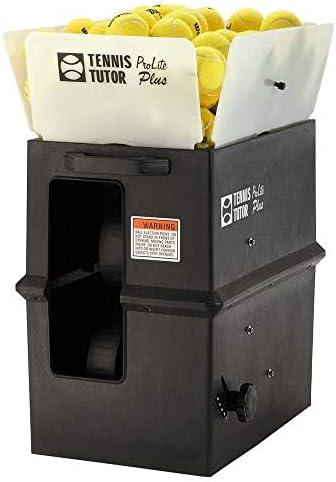
The Prolite Plus builds on the Prolite’s random oscillator and knob controls with a one-touch spin switch. You can select topspin or underspin, each described as applying a medium amount of spin to all shots. Its speed range is listed as 10 to 75 mph, and it can feed balls every 1.5 to 10 seconds.
The 110-ball capacity is slightly lower than the standard Prolite’s, but it is still suited to longer practice blocks between reloads. A built-in rechargeable battery is listed for up to four hours of play per charge. The towing handle and large wheels support transport around the court.
This model makes sense if you want to practice with both random placement and a basic choice of spin, without relying on an app. The spin controls are simple, but they do not offer the multi-level adjustment described for the PUSUN. As with the other Sports Tutor model, its controls are physical knobs rather than phone-based settings.
Pros:
- Built-in random oscillator
- One-touch topspin and underspin selection
- Stated speed range up to 75 mph
- 110-ball capacity and up to four hours of use per charge
Cons:
- Spin selection is limited to the listed one-touch options
- No app or remote control is listed
Verdict: Choose the Prolite Plus over the standard Prolite if spin practice is a priority and you still want random feeds and simple knob controls.
5. PUSUN PT-Smart Pro: Structured Drills and App Compatibility

The PUSUN PT-Smart Pro is designed for players who want more structured practice options. Its listing describes internal oscillation, app and remote control, and Apple Watch compatibility through the PUSUN app. For tennis, it offers 28 landing points and 12 training modes, with the stated aim of supporting work on strokes, movement, and consistency.
The machine is listed with a 12–75 mph speed range, feed intervals from 1.8 to 8 seconds, and six adjustment levels each for topspin and backspin. Its capacity is 100 or more balls, and the stated battery runtime is four to six hours. A telescopic handle and large wheels are included for moving it between locations.
The range of modes and settings may appeal to intermediate and advanced players who want to change drills often. However, the supplied availability information marks this product as unavailable. Availability can change, so check the linked listing before making plans to buy. The larger feature set may also be more than a beginner needs if simple, repeatable feeds are the goal.
Pros:
- Internal oscillation with app and remote control
- Multiple tennis landing points, modes, and spin adjustment levels
- 100+ ball capacity and stated four-to-six-hour battery runtime
- Apple Watch compatibility is listed
Cons:
- Listed as unavailable in the supplied product information
- Its many modes and controls may be unnecessary for players seeking basic feeding
Verdict: The PT-Smart Pro has the broadest listed training controls here, but only consider it if the linked listing is available and you want app-based drills, adjustable spin, and a large ball capacity.
How to Choose an Oscillating Tennis Ball Machine
Match the oscillation to your practice goals
Oscillation can make practice more active by sending balls to different parts of the court. Check whether a machine offers random court distribution, programmed landing points, or movement of the launch port through a particular range. These are not the same feature: for example, the Sports Tutor models list a random oscillator, while the Furlihong details emphasize an automatically adjustable up-and-down launch port.
Choose a speed range you can use
A higher maximum speed can be useful for faster drills, but it is not the only measure of a machine’s value. Consider whether its stated range includes manageable feeds for your current level. The machines in this guide range from a maximum of 37 mph for the SENODON to 75 mph for the Prolite Plus and PUSUN, while the Furlihong listing does not provide a numerical range.
Consider spin and shot options
If you want to practice responding to different ball behavior, look for clearly stated spin settings. The Prolite Plus offers one-touch topspin or underspin, while the PUSUN lists six adjustment levels for each. The SENODON also lists adjustable spin types. Compare that with the basic Prolite, which does not list spin control.
Check capacity and feed interval
A larger hopper means fewer pauses to reload, especially if you plan long sessions or want to focus on movement. The Prolite holds 125 balls, the Prolite Plus holds 110, and the PUSUN holds 100 or more. The SENODON holds 50. Feed intervals also affect training pace; compare the stated ranges with whether you want time to reset between balls or a quicker sequence.
Think about battery life and power access
Runtime figures can help you estimate how long a session may last, but they are stated specifications rather than a guarantee for every use. The SENODON lists two to four hours, the Sports Tutor models list up to four hours, and the PUSUN lists four to six hours. The Furlihong offers battery and AC power options, but the supplied details do not state its runtime.
Look at controls and setup
App control can make it easier to change settings without walking back to the machine, while physical knobs can be more direct if you prefer a simple setup. The SENODON offers both an app and remote, and the PUSUN lists app, remote, and Apple Watch compatibility. The Sports Tutor machines use knob controls. Consider which approach will be easiest to use during your drills.
Plan for transport and included equipment
Machines with wheels, towing handles, or a carrying bag can be easier to move to and from the court. Also check what is included: the Furlihong listing specifically notes that tennis balls are not included. The supplied details do not give a weight for every model, so confirm the product listing if lifting or storage space is a key concern.
Frequently Asked Questions
What does an oscillating tennis ball machine do?
It changes where balls are sent instead of repeatedly feeding to one spot. Depending on the model, oscillation may be random or may involve a moving launch port. This can help you practice moving to the ball and recovering between shots.
Which machine has the largest stated ball capacity?
The Tennis Tutor Prolite lists a 125-ball capacity, the largest specified capacity among these options. The PUSUN lists 100 or more balls, while the Prolite Plus lists 110.
Which option is easiest to use without a phone app?
The Tennis Tutor Prolite and Prolite Plus use knob controls and do not list app control. The Furlihong also describes straightforward speed adjustment, though its supplied details provide less information about the full control layout.
Do all of these machines offer spin control?
No. The SENODON, Prolite Plus, and PUSUN list spin options. The standard Prolite does not list spin adjustment, and the Furlihong details do not specify spin settings.
Are tennis balls included?
The Furlihong listing says tennis balls are not included. The supplied details do not confirm whether balls are included with the other machines, so check each listing before purchasing.
Which machine has the fastest stated top speed?
The Tennis Tutor Prolite Plus and PUSUN PT-Smart Pro both list a maximum speed of 75 mph. The Prolite lists up to 70 mph, while the SENODON lists up to about 37 mph. The Furlihong description does not provide a numerical speed range.
Which machine should a beginner consider?
A beginner may prefer straightforward controls and a speed range that allows manageable feeds. The SENODON offers adjustable settings and app or remote control, while the Prolite has simple knobs and a large hopper. Compare the control style and speed range with the drills you plan to practice.
Final Recommendation
For random feeds and a large hopper with simple controls, the Tennis Tutor Prolite is a strong all-around choice based on its listed features. Choose the Prolite Plus if you also want one-touch topspin and underspin. The SENODON is a practical alternative for players who value app and remote adjustments, while the PUSUN stands out for its broad set of structured drills if it is available. Before choosing, compare the machine’s oscillation style, capacity, power needs, and controls with the way you plan to train.