
Disclosure: As an Amazon Associate I earn from qualifying purchases. Learn more
Spin changes how a tennis ball behaves after it bounces, so a useful practice machine should let you work on topspin, underspin, or both. The options below range from simple one-touch controls to app-guided drills, and they differ in portability, ball capacity, and how much detail they provide about spin. Use the comparison table to narrow your choices, then check the buying guide to match a machine to your practice goals.
Quick Comparison
| Machine | Spin features | Notable details | Best fit |
|---|---|---|---|
| LOBSTER Sports Elite One | Adjustable topspin and backspin | 10–80 mph; horizontal oscillation; electronic elevation | Players seeking adjustable practice shots |
| PONGBOT Tennis Ball Machine | Up to 60 rps | App and remote control; custom drills; over eight hours of stated runtime | Players who want drill variety and app control |
| Veva R3 Pro | Topspin and backspin | 28 programmable shot locations; voice control | Players interested in location-based drills |
| Tennis Tutor Prolite Plus | One-touch medium topspin or underspin | 10–75 mph; 110-ball capacity; random oscillator | Players who prefer simple controls |
| Foldable Tennis Ball Machine | Topspin and backspin | 18-ball capacity; remote control; power-bank compatible | Beginners seeking a compact practice option |
Our Picks: Best Tennis Ball Machines for Spin reviews
LOBSTER Sports Elite One: Adjustable Spin and Shot Placement

The Elite One is a portable, battery-operated machine for players who want to vary both the pace and shape of their practice shots. Its speed range is 10 to 80 mph, and its spin control can add topspin or backspin. That gives you room to practice slower, higher-bouncing feeds as well as faster ground strokes.
Horizontal oscillation sends balls left, right, down the center, or to random positions. Electronic elevation control allows lobs up to 60 degrees, so you can mix baseline work with overhead practice. The machine weighs 42 pounds and has an inverting hopper, folding handle, and 8-inch all-terrain wheels. Its stated battery runtime is four to six hours.
Compared with the PONGBOT, the Elite One offers less detail about programmable drills and does not list a spin rate. Its appeal is a more direct set of court-practice controls: speed, spin, direction, and elevation. The weight may still be a consideration if you need to carry the machine rather than roll it.
Pros:
- Adjustable speed from 10 to 80 mph
- Topspin and backspin control
- Horizontal oscillation and electronic elevation
- Wheels and folding features support transport
Cons:
- At 42 pounds, it is not especially light to lift
- The supplied details do not quantify the spin rate
Verdict: Choose the Elite One if you want adjustable spin, court coverage, and lob practice in one portable machine, and can manage its weight.
PONGBOT Tennis Ball Machine: High Spin Rate and App-Based Drills

The PONGBOT is the most feature-rich choice in this group for players who want guided practice. It lists a maximum speed of 80 mph and spin up to 60 revolutions per second. The supplied details do not break that spin figure down by shot type, but the stated rate gives you a clear specification to compare with machines that only describe spin as adjustable.
The machine works with an app and remote, supports custom drills, and includes hundreds of preloaded drills. You can sync up to 30 drills from the app to the remote, while the user community can share and download drills. It also lists six oscillation spots and a removable battery rated for over eight hours of runtime.
That control range may suit players who like structured sessions and changing routines. The trade-off is added setup and app dependence compared with the knob-based Tennis Tutor. Its smart training options may also be more than you need if your main goal is to repeat a simple topspin or underspin feed.
Pros:
- Lists spin up to 60 rps and speed up to 80 mph
- App, remote, preloaded drills, and custom drills
- Six oscillation spots
- Removable battery with over eight hours of stated runtime
Cons:
- App features may feel unnecessary for simple practice sessions
- The supplied details do not specify separate topspin and backspin settings
Verdict: Pick the PONGBOT if you value drill variety, app control, and a stated high spin rate more than a minimalist setup.
Veva R3 Pro: Voice Control and Programmable Shot Locations

The Veva R3 Pro is designed around location-focused drills. It offers adjustable topspin and backspin, horizontal oscillation, and 28 programmable shot locations. Voice control lets you start, stop, and adjust drills without reaching for a control, which can help keep a solo practice session moving.
The hopper holds 80 balls, with feed intervals from one to nine seconds, and the listed runtime is up to six hours. At 16.5 pounds, it is lighter than the Elite One, and its description also mentions an optional remote and over-the-air firmware updates. No maximum speed or spin rate is provided in the supplied details, so players who need those numbers should compare carefully before choosing.
The biggest limitation is availability: the supplied product information marks this model as unavailable. That may change, but it is worth checking the listing before building your practice plan around it. If it is available to you, its stated shot-location options make it a distinctive choice for footwork and placement drills.
Pros:
- Adjustable topspin and backspin
- 28 programmable shot locations
- Voice control and an optional remote
- Lightweight design and up to six hours of stated runtime
Cons:
- Supplied product information marks it unavailable
- Maximum speed and spin rate are not stated in the supplied details
Verdict: Consider the Veva R3 Pro if its programmable locations and hands-free controls fit your training needs, but confirm availability and clarify performance specifications first.
Tennis Tutor Prolite Plus: Simple One-Touch Spin Selection
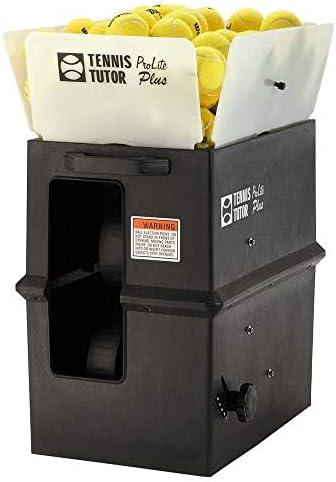
The Prolite Plus keeps spin selection straightforward: press one switch for medium topspin or another setting for medium underspin. This is less adjustable than the Elite One’s spin control, but it avoids a more involved app or drill setup. It throws balls from 10 to 75 mph and can feed at intervals from every one and a half seconds to every ten seconds.
Its 110-ball capacity is the largest stated in this group, which can mean fewer interruptions to reload. A random oscillator sends shots across the court, and the machine can deliver groundstrokes or lobs. The built-in rechargeable battery is rated for up to four hours of play, and the product information lists towing wheels and a handle for rolling it.
One useful distinction is the stated three-year warranty and factory service in Burbank, California. The machine is described as made in the USA. Its main compromise for spin-focused players is that the spin amount is described as medium rather than as a finely adjustable setting.
Pros:
- Simple one-touch topspin and underspin settings
- 110-ball capacity
- Adjustable feed interval and random oscillation
- Three-year warranty and factory service are listed
Cons:
- Spin is described as medium, not as a variable intensity setting
- Stated battery runtime is up to four hours
Verdict: Choose the Prolite Plus if you want easy spin selection, a large hopper, and straightforward controls rather than a broad set of programmable features.
Foldable Tennis Ball Machine: Compact Practice with Topspin and Backspin

This generic foldable machine is a smaller-capacity option for basic practice. Its description lists topspin and backspin, adjustable feed frequency, a remote control, and room for 18 balls. It also includes a 101-centimeter foldable ball collection tube, intended to help pick up balls without bending over.
The machine is compatible with power banks that have a 9V-plus Type-C output. The listing states more than four hours of play and says a 10,000 mAh power bank can provide five to six hours of use. It also describes a two-meter throwing height, though it does not provide a speed range, a spin rate, or details about shot-location programming.
Compared with the larger machines here, its small capacity means more frequent refills during a long session. It may be a practical starting point if you value a foldable design and a simple training setup, but players seeking detailed spin adjustment or varied court coverage will find more stated control options in the other picks.
Pros:
- Lists both topspin and backspin
- Compact 18-ball capacity and foldable design
- Remote control and adjustable feed frequency
- Power-bank compatibility and included ball collection tube
Cons:
- Small capacity compared with the other listed machines
- Speed range and spin rate are not specified in the supplied details
Verdict: This is worth considering for basic, portable practice, but look elsewhere if precise spin settings, high capacity, or detailed shot programming are priorities.
How to Choose a Tennis Ball Machine for Spin
Decide Which Spin Shots You Need
Start by thinking about the shots you want to practice. Topspin and underspin create different ball paths and bounce behavior, so make sure a machine explicitly offers the type you want. If you need to switch between both, check whether the machine provides separate settings. Some models describe a set spin level, while others offer adjustable spin without listing a specific rate.
Compare Spin Control with Speed
Spin is only one part of a useful feed. A machine also needs to deliver the ball at a pace that matches your practice. The listed speed ranges differ: the Elite One reaches 80 mph, while the Prolite Plus reaches 75 mph. The PONGBOT also lists a maximum of 80 mph. If a product does not state a speed range, do not assume it matches the others.
Look at Ball Capacity and Feed Intervals
A larger hopper can reduce how often you stop to reload, especially during longer solo sessions. The Prolite Plus lists capacity for 110 balls, while the Veva R3 Pro holds 80 and the foldable model holds 18. Feed interval controls also matter: faster feeds can challenge your reaction time, while slower intervals give you more time to reset between shots.
Choose the Right Kind of Court Coverage
Oscillation and programmed shot locations can make a practice session more demanding by moving you around the court. The Elite One offers horizontal oscillation, the PONGBOT lists six oscillation spots, and the Veva R3 Pro lists 28 programmable shot locations. If you mainly want to repeat the same stroke from one place, advanced placement controls may be less important.
Consider Battery Runtime and Transport
Check both the stated runtime and how you will move the machine from your car to the court. The listed runtimes range from up to four hours for the Prolite Plus to over eight hours for the PONGBOT. Weight, wheels, folding parts, and battery design can affect convenience. For example, the Elite One has wheels and a folding handle but weighs 42 pounds; the Veva R3 Pro lists a weight of 16.5 pounds.
Match the Controls to Your Practice Style
Knobs and switches suit players who want to make quick changes without using a phone. App controls can offer custom drills and saved routines, as with the PONGBOT. Voice control, as listed for the Veva, may help when you want hands-free adjustments. Consider which features you will use regularly rather than choosing a machine based only on the length of its feature list.
Check Availability and Missing Specifications
Before choosing, confirm that the model is available and review the listing for details that matter to your training. The supplied information marks the Veva R3 Pro as unavailable. Some other listings do not specify a spin rate or speed range. If a number is important to you, look for it in the product details rather than treating a general claim about spin as a precise performance measure.
Frequently Asked Questions
What makes a tennis ball machine suitable for spin practice?
Look for a clear topspin or underspin setting, plus a useful way to adjust shot speed and direction. Machines that specify spin rates or offer adjustable spin intensity provide more detail than models that simply say they add spin.
Which machine in this list gives the clearest spin-rate specification?
The PONGBOT lists spin up to 60 revolutions per second. The other supplied descriptions identify spin features or settings but do not provide a comparable numerical spin rate.
Which option has the simplest spin controls?
The Tennis Tutor Prolite Plus uses a one-touch switch for medium topspin or medium underspin. That keeps operation simple, though it does not provide the same stated level of spin adjustment as the Elite One.
Does every machine here offer both topspin and backspin?
The supplied descriptions explicitly list both for the Elite One, Veva R3 Pro, Tennis Tutor Prolite Plus, and foldable machine. The PONGBOT lists a maximum spin rate but does not specify separate topspin and backspin settings in the supplied details.
Which machine holds the most balls?
The Tennis Tutor Prolite Plus lists a 110-ball capacity. The Veva R3 Pro holds 80 balls, while the foldable machine holds 18. The supplied descriptions do not state a ball capacity for the Elite One or PONGBOT.
What should I choose if I want guided or custom drills?
The PONGBOT is the clearest fit for app-based drill options: it lists preloaded drills, custom drills, and a way to sync drills from the app to its remote. The Veva R3 Pro lists 28 programmable shot locations, though its supplied availability status is unavailable.
Final Recommendation
For a strong balance of adjustable spin, speed, and court coverage, the LOBSTER Sports Elite One is the most rounded choice in this group. Choose the PONGBOT if you want app-guided drills and a stated spin rate, or the Tennis Tutor Prolite Plus if simple one-touch controls and a large ball capacity matter more. Before buying, confirm availability and check that the machine’s stated spin and speed features match the shots you want to practice.